URGENT UPDATE: Users looking to switch from Windows 11 to Ubuntu can now easily transform their Linux experience to closely mimic Microsoft’s interface. This innovative method was just revealed, making the transition smoother for those hesitant to leave their familiar environment.
Switching operating systems can be daunting, but new reports confirm that with a few simple adjustments, you can create a Windows-like interface on Ubuntu. This is particularly significant for users who want the benefits of Linux without sacrificing the comfort of their current UI.
To achieve this transformation, start by installing GNOME Extensions. These tools are essential for creating a familiar desktop environment. First, users must set up Flatpak and Flathub. To do this, simply open your terminal and enter the necessary commands. This will enable you to access a new Software application that simplifies the process of browsing and installing extensions.
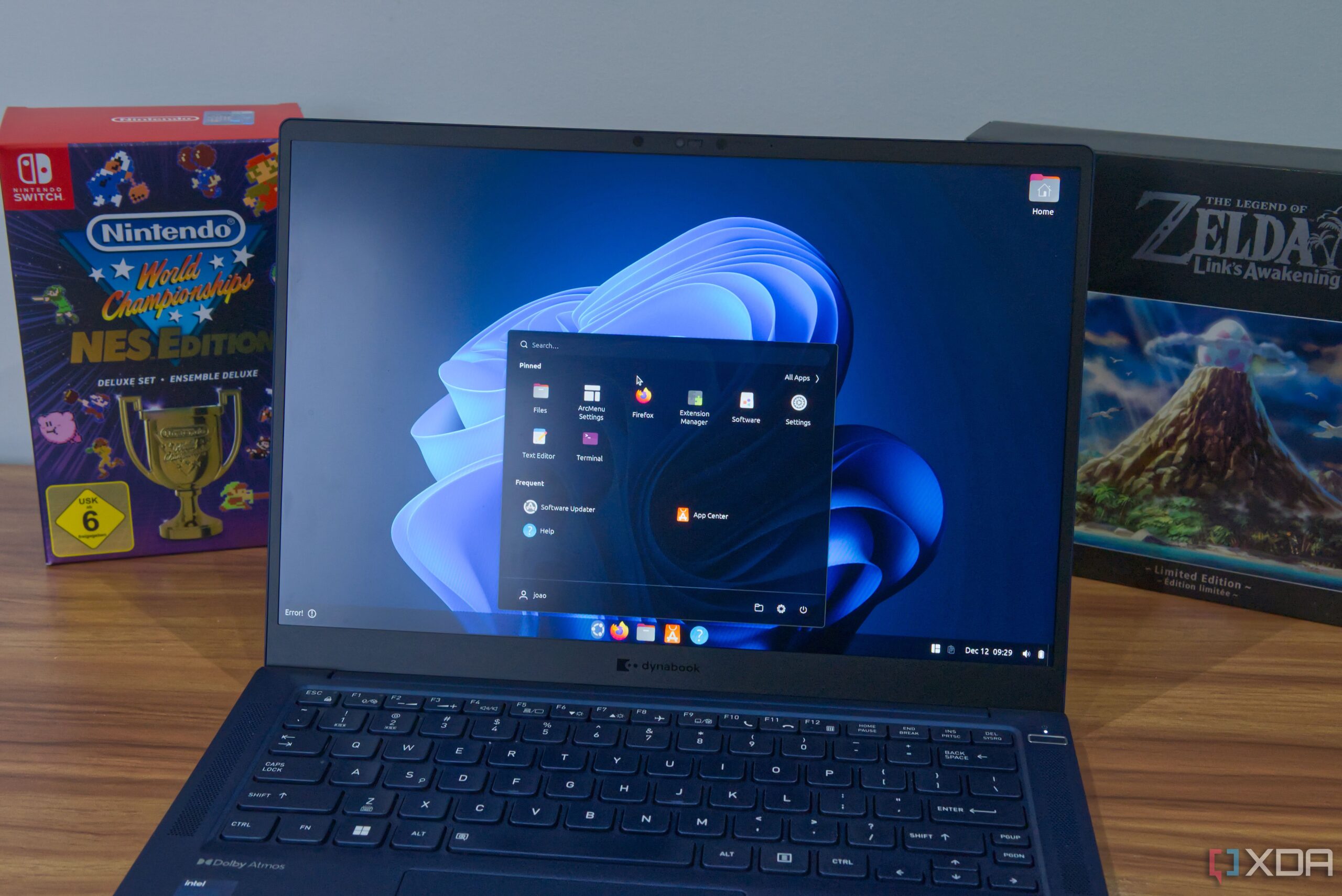
Next, bring back the iconic Start menu and taskbar. This can be accomplished with two key extensions: Dash to Panel and ArcMenu. Dash to Panel enhances Ubuntu’s Dash, transforming it into a customizable taskbar that surpasses the standard Windows taskbar in flexibility. Meanwhile, ArcMenu replicates the Windows 11 Start menu, allowing users to select layouts that closely resemble their favorite version of Windows.
For an authentic Windows 11 look, users should choose the layout called “11” within ArcMenu and opt for the default color themes. This customization allows for a high degree of personalization, making the experience more tailored than what Windows offers.
Additionally, to enhance functionality, consider adding extensions like Media Controls for music playback, Notification Banner Reloaded for notification management, and SimpleWeather for a weather widget—mimicking the features of Windows 11 without the clutter.
But that’s not all. To optimize multitasking, users can implement the Tiling Assistant extension or the more advanced Tiling Shell for a truly seamless window management experience. This feature allows for snapping apps into user-defined areas, boosting productivity and making it easier to manage multiple tasks simultaneously.
Finally, don’t forget to personalize your desktop with stunning Windows 11 wallpapers. Microsoft’s collection is available for download, ensuring your new setup looks as good as it feels.
This guide demonstrates that users don’t need to switch to niche Linux distributions like Zorin or AnduinOS to achieve a Windows-like experience. Instead, by using the popular and reliable Ubuntu alongside these powerful extensions, you can enjoy both familiarity and enhanced functionality.
For those hesitant about the switch to Linux, this method offers a practical solution, making it easier than ever to embrace a new operating system while retaining a beloved interface. The growing community around Ubuntu’s customization continues to thrive, proving that innovation and user-friendliness can coexist.
Stay tuned for more updates on this developing story and share your experiences with transforming Ubuntu to suit your needs!